Agentic Tools for Your Work
Learning Objectives
After this chapter, you should be able to:
- Recognize the shared anatomy of every agentic workbench (folder access, permission modes, instructions, skills, connectors, automations) and explain why learning one transfers to all of them.
- Set up MimiWork, this book's companion tool, and complete a real task that ends in a finished file rather than a conversation.
- Move a working habit from MimiWork to Claude Code, Codex, OpenCode, or another agent using the transfer map at the end of the chapter.
Chapter 15 explained what coding agents are and why they matter to leaders. This chapter is about sitting down and using one. The tools it covers, Claude Code, Codex, OpenCode, Antigravity, Grok Build, Kimi Code, and MimiWork, are the practical face of everything in Part I: the prompt is your request, the context is the folder you grant, the harness is the app, the loops are its automations, and the connectors are its graph of tools. My claim is that an afternoon with any of them teaches more about the real state of AI than a quarter of briefings, and my recommendation is specific: start with MimiWork, the free companion tool built for this book, because everything you learn there transfers directly to the others.
A disclosure first, in keeping with the Preface. MimiWork is a project I built, and it is offered free to readers of this book at gaiforbusiness.com/mimiwork. It is here because it was designed for exactly the readers of this book, executives, researchers, and analysts who need finished documents and analyses rather than code, and because I can describe its construction honestly. The other tools in this chapter are excellent, and by the end of it you will be able to use any of them.
16.1 One Skill, Many Tools
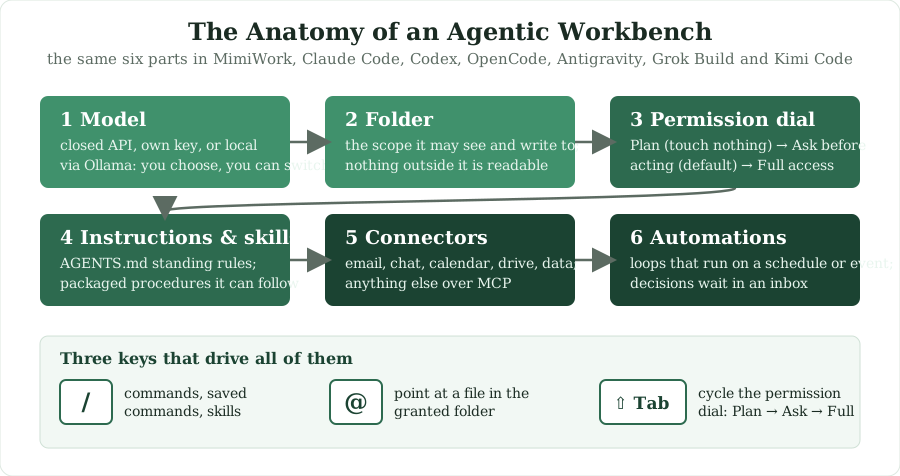
Every agentic workbench in 2026 is built the same way, whatever its logo. There is a model, which you may choose. There is a folder or repository the agent is allowed to work in, and nothing outside it. There is a permission dial with roughly three settings: plan only, ask before acting, and act freely. There is an instruction file in which you write your standing preferences once. There are skills, which are packaged procedures the agent can follow. There are connectors, through the Model Context Protocol or a built-in catalog, that reach your email, calendar, chat, documents, and data. And there are automations, which run a task on a schedule or in response to an event while you are elsewhere. Chapter 3 called these layers context, harness, and loop engineering; the products simply give them buttons.
Because the anatomy is shared, the skill is portable. The habit of granting the right folder, of reading a plan before approving it, of writing instructions once rather than repeating them, of packaging a procedure as a skill, and of turning a recurring request into an automation, works identically in Claude Code, Codex, OpenCode, and the rest. The standards underneath are increasingly shared too: an instruction file named AGENTS.md or CLAUDE.md is read by most of the tools, MCP servers plug into all of them, and skill folders move between them with little change. Learn one tool properly and you have learned the category, which is the reason this chapter teaches one in depth rather than seven superficially.
16.2 The Workbenches in 2026
Claude Code (Anthropic) is the reference terminal agent and the one whose vocabulary the others borrowed: plan mode, permission modes, CLAUDE.md instructions, skills, sub-agents, and scheduled automations. It runs in a terminal, an IDE, a desktop app, or the browser, and it is the tool most engineering teams mean when they say "coding agent." Codex (OpenAI) offers the same capabilities in a command-line tool, an IDE extension, and a cloud service that runs tasks asynchronously in sandboxes, and it has become the second standard. OpenCode is the open-source alternative: a terminal agent that works with any model, closed or open-weight, which makes it the natural choice for organizations whose data-governance rules require a self-hosted model. Antigravity is Google's agent-first development environment, built around Gemini and a manager view for directing several agents at once. Grok Build is xAI's terminal agent, built on its Grok Code models and notable for running several sub-agents in parallel at aggressive prices. Kimi Code is Moonshot's open-source terminal agent, tuned for the open-weight Kimi models and pointable at other providers. IBM Bob, mentioned in Chapter 15, is the enterprise-modernization entry, with specialized workflows for legacy systems and the administrative controls large organizations require.
MimiWork differs in audience rather than anatomy. Where the others were built for developers and then discovered by everyone else, MimiWork was built for knowledge workers from the start: it opens statistical files with their labels intact, writes finished Word, PowerPoint, Excel, and PDF documents, runs Python and R on your machine, and connects to the services where non-technical work happens. It is a desktop application for macOS and Windows rather than a terminal, it is free, and because it shares the anatomy of Section 16.1, it is the gentlest entry point into the category. The rest of this chapter is its tutorial. If you already use Claude Code or Codex, skim it for the transfer map in Section 16.5 and the weekly plan in Section 16.6.
16.3 MimiWork: The Companion Tool for This Book
MimiWork is the practical companion to this book, and it is free for readers. Download it at gaiforbusiness.com/mimiwork for macOS or Windows. Every exercise in this book that ends in a document, an analysis, or an automation can be run in it: the pilot charter, eval design, ROI model, and governance intake from the Appendix can be handed to MimiWork as tasks, the discussion questions can be argued with it, and the fifteen-minute currency check from Chapter 4 can become one of its automations. The one habit that matters most, and the one this book has been teaching in different words since Chapter 3, is to ask for the outcome rather than the steps. MimiWork's job is to hand you a finished file. "Read these transcripts and write me a themed summary as a Word document" gets you a document. "Can you help me analyze interviews?" gets you a conversation.
Three design choices explain how it behaves. It is local-first: it works in folders on your own disk, and nothing outside the folders you grant is readable, which is the entire privacy model. It is model-agnostic: you can sign in for the built-in Mimi models, paste your own key for OpenAI, Anthropic, Gemini, Kimi, DeepSeek, Mistral, and a dozen others, or run fully local models through Ollama, the option Chapter 4 recommends for sensitive data. And it asks before anything consequential: sending a message, writing outside a granted folder, running a shell command, or pulling data from a server produces an approval card every time, unless you deliberately move the permission dial.
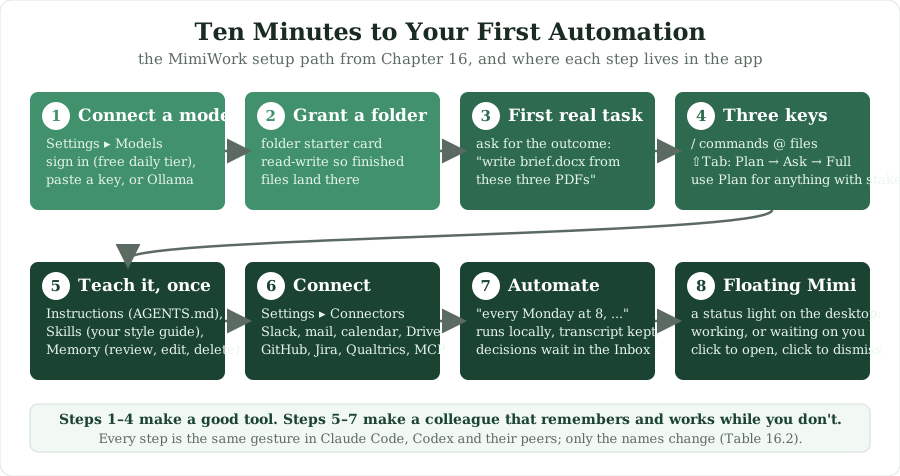
16.4 The MimiWork Tutorial: Ten Minutes to Your First Automation
Every step below works on a fresh install, and none of it needs a developer.
Step 1. Connect a model (two minutes)
Open Settings and choose Models. There are two ways in. The first is to sign in with a QualiTaTi account, which needs no keys: the built-in Mimi models spend your existing credits, and the card shows three tiers, Mimi Puppy (free every day), Mimi Hound (fast), and Mimi Wolf (most capable), each with a Test button that makes a real one-token call so you know it works before you need it. Two settings are worth making while you are there. The model region can be the default (US, cheaper credits) or strict GDPR (Paris), in which case your data stays in Europe, and the choice applies to your account's next message on every device. The Activity page in the sidebar shows exactly what each call cost and which pool paid, with numbers from the server's ledger rather than an estimate. The second way in is to paste your own key from OpenAI, Anthropic, Gemini, Kimi, DeepSeek, Mistral, or another provider, or to run fully local through Ollama. You can switch models at any time from the picker in the composer.
Step 2. Give it a folder
Click the folder starter card, or simply ask it to work in a folder by name. Nothing outside the folders you grant is readable, so grant the folder where the real files live. The folder you pick during setup is remembered, and every new conversation starts with it already granted; change or clear it under Settings, Files, where a checkbox decides whether Mimi may save into it (read-write) or only read. Leave it read-write if you want finished files to land there. Folders you grant inside a single conversation stay with that conversation; a one-off is a one-off.
Step 3. The first real task
With a folder granted, try one of these, with your own filenames. Ask it to read the three PDFs in the folder and write a one-page brief as a Word document, keeping the numbers in a table. Ask it to profile a survey data file and tell you what is in it before doing anything else. Or ask it to turn a results spreadsheet into a ten-slide deck that argues for a specific decision, with speaker notes for a co-presenter. While it runs, four things will happen. Anything consequential asks first, through an approval card. You can steer without stopping: if you see it heading the wrong way, type a correction and it lands at the next safe step, without restarting anything. You can drop files straight into the chat: a file from a granted folder becomes an @mention and is worked on in place, while a file from anywhere else is copied into the session's folder, visibly, and opened with the right tool. And the finished file lands in your folder, never in the conversation's temporary space, once you have granted a folder Mimi may write to. The Artifacts panel lists what you asked for, the report, the workbook, the chart, and keeps the script that produced it out of the way; the Files page keeps every deliverable from every session in one place.
Step 4. Three keys to learn
| Key | What it does | In Claude Code / Codex |
|---|---|---|
| / | The command palette: app commands (/plan, /compact, /init, /model), your saved commands, and your skills | Slash commands: the same gesture, largely the same names |
| @ | Point at a specific file in a granted folder, with no path typing | @-mentions of files in the working directory |
| Shift+Tab | Cycle permission modes: Plan (propose first, touch nothing), Ask for approval (the default), Full access | The same key cycles plan and permission modes in Claude Code; Codex exposes the same modes as approval settings |
Plan mode deserves special mention, and it is the habit Chapter 15 asked you to practice. For anything with stakes, a deliverable for a client or a large reorganization of your data files, press Shift+Tab into Plan first. Mimi proposes the whole approach, you approve or redirect, and only then does it run. One minute of reading a plan beats twenty minutes of redoing the work. If you already know Claude Code, Cowork, or Codex, these are the same gestures, and the Transfer guide under Settings maps every MimiWork concept to its name in those tools.
Step 5. Teach it your way, once
The difference between a good tool and a colleague is that a colleague remembers. MimiWork remembers in three places. Instructions (Settings, Instructions, or an AGENTS.md file in your folder; a CLAUDE.md works too) hold standing rules such as "reports in UK English, statistics always with effect sizes, never touch files in the raw folder." Skills (Settings, Skills) hold packaged know-how: the starter card that packages your style guidelines into a skill walks you through your first one, with brand colors, fonts, and house rules, and from then on every deck and document comes out in them without being asked. The skill store holds thousands of community skills organized by shelf, and you should read a skill's actual instructions before installing it, for exactly the governance reasons Chapter 15 gave; if you already have skills in a Claude Code skills folder, the Skills tab finds and imports them. Memory (Settings, Memory) holds what Mimi noticed and kept, and you can review, edit, or delete it.
Step 6. Connect where you work
Under Settings, Connectors, MimiWork reaches Slack (tag Mimi in a channel and the finished work comes back in the thread), Gmail and Outlook, Google Calendar and Drive, GitHub, Jira, Notion, Canva, and Qualtrics, where it can read a survey's questionnaire so that a variable code becomes a real question and pull responses as CSV or labeled SPSS files, with your approval per download. It also connects to QualiTaTi research data (projects, interviews, surveys), and each retrieval asks first. Anything else speaks MCP, the protocol from Chapter 7, which means any connector built for Claude Code or Codex works here as well.
Step 7. Make it run while you don't
Ask in plain words for something recurring: every Monday at eight, read the new files in the field-notes folder and put a one-page weekly summary in the reports folder. That becomes an Automation, listed in the sidebar, running locally with its full transcript kept, and anything that needs a decision waits in your Inbox instead of being guessed. Watching a Slack channel, refreshing a weekly deck, or chasing a dataset follows the same pattern. This is loop engineering from Chapter 3 with a button on it, and it is the point at which the tool stops being an assistant and starts being an automation in the Five A's sense.
Step 8. The floating Mimi
The small companion on your desktop is a status light: it shows when Mimi is working and when something is waiting on you. Drag it anywhere and it stays put. Clicking the icon opens the app and counts as "seen," so a finished-task notification you have already looked at will not keep repeating, and clicking a bubble dismisses just that message.
16.5 Transferring What You Learned
The claim of Section 16.1 was that the skill is portable. Table 16.2 makes it concrete by mapping each MimiWork concept to its equivalent in the developer-facing tools. The names differ; the habits do not.
| What you learned in MimiWork | Claude Code | Codex | OpenCode, Kimi Code, Grok Build, Antigravity |
|---|---|---|---|
| Granting a folder | The working directory you start it in; additional directories can be added | The repository or folder the session opens | Same: the current directory or repository |
| Permission modes (Plan, Ask, Full access) | Plan mode and permission modes, cycled with Shift+Tab | Approval modes (suggest, auto-edit, full auto) and sandboxing | Equivalent modes; OpenCode and Kimi Code separate plan and build agents |
| Instructions (AGENTS.md or CLAUDE.md) | CLAUDE.md, at project or user level | AGENTS.md | AGENTS.md is read by most; Antigravity uses rules files |
| Skills | Skills folders, invoked by slash command or automatically | Custom instructions and skills | Skills or custom commands, depending on the tool |
| Connectors | MCP servers and built-in connectors | MCP servers | MCP servers everywhere |
| Automations and the Inbox | Scheduled tasks and routines, with notifications | Cloud tasks and automations | Scheduling varies; scripts around the command-line tool are common |
| Approval cards | Permission prompts | Approval prompts | Permission prompts |
| Artifacts and the Files page | Files in the working directory; the transcript records what was produced | Files in the repository or a pull request | Files in the working directory |
The one real difference is the audience the tools assume. The developer tools expect you to be comfortable in a terminal and to want code as the deliverable; MimiWork expects you to want a document. Everything else, the folder, the dial, the instruction file, the skills, the connectors, and the loops, is the same idea wearing a different interface, which is why an executive who has spent a week in MimiWork can sit beside an engineer using Claude Code and follow exactly what is happening.
16.6 A Good Week with an Agent, in Five Asks
The fastest way to internalize the category is to give it a week of real work. On Monday, grant it a folder and ask it to profile every data file in it and produce a data dictionary as a Word document; you will learn how it reads, how it asks, and where its output lands. On Tuesday, package your organization's brand or style guidelines into a skill, so that every future deck and document is on-brand without being asked; you will learn how instructions and skills differ. On Wednesday, in plan mode, ask it to turn a set of findings into a twelve-slide deck for a steering committee that argues for a specific decision, with speaker notes; you will learn to read a plan before approving it. On Thursday, pull a live dataset through a connector and ask a real analytical question, insisting on effect sizes rather than only p-values; you will learn what connectors and approvals feel like. And on Friday, ask it to summarize a chat channel's week into a memo in your reports folder every Friday at four; you will have built your first automation.
By Friday you have a data dictionary, an on-brand deck, a real analysis, and a standing loop, and every file is on your disk, made with your keys, under your approval. More importantly, you have practiced the five habits that transfer to every agentic tool and that Chapter 15 argued will define knowledge work: granting scope deliberately, reading plans, writing instructions once, connecting systems through a governed door, and designing loops instead of prompts. That is the skill this book set out to teach, and the tool in your hands is the place to keep practicing it.
Discussion Questions
- Run the five-day plan in Section 16.6 in MimiWork or another agentic tool. Which day taught you the most, and what surprised you about where human judgment was needed?
- Write the instruction file for your own team: the ten standing rules an agent should follow in every task. Which of them would you have struggled to articulate a year ago?
- Which of your team's recurring weekly tasks should become an automation first, and what would the approval and inbox design look like so that nothing consequential happens without a person?